Research about Version Control for ML dataset and Model
I used gitlab and minio and k8s 1.16
Official guide give exmaple withgitandaws S3, I tried withminio
머신러닝 데이터셋, 모델 버전관리를 위한 dvc 리서치 기록
git과 S3 를 기준으로 가이드 되어 있지만, minio를 사용하였습니다.
Workflow ( on each dvc init & add, also use git add & commit )
- using
.dvcon git you can control version of large model and dataset
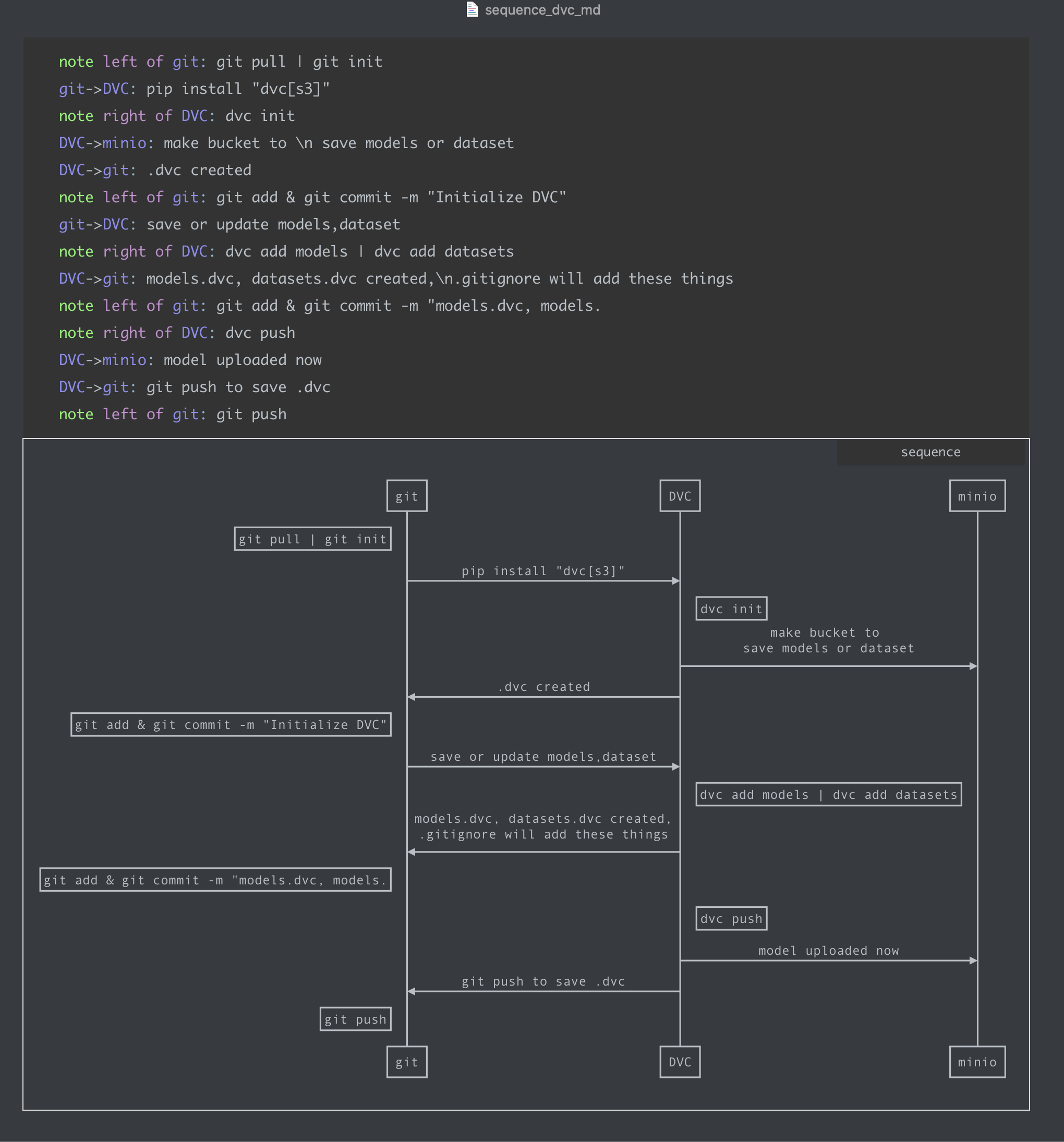
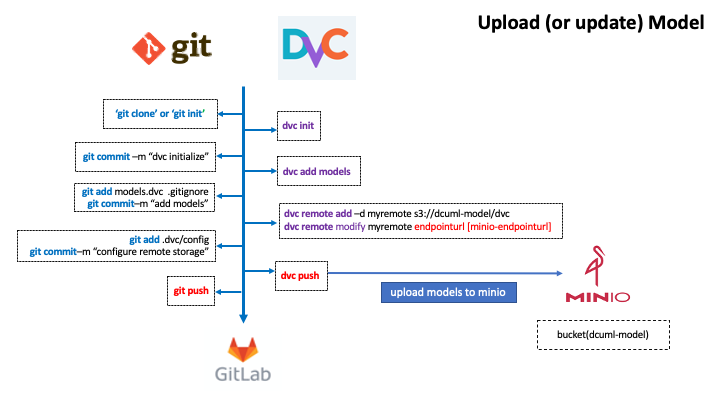
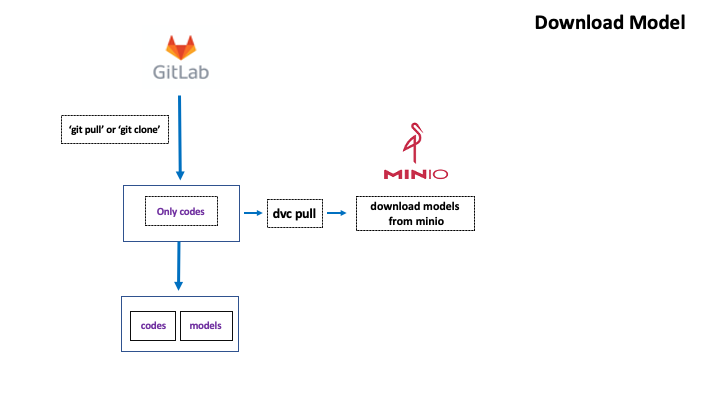
Pre 1. Use python venv 3.6~3.8 ( dvc recommended)
sudo apt-get update
sudo apt-get install python3-venv

mkdir dvc-test
cd dvc-test
python3 -m venv myenv
source myenv/bin/activate

# exit
deactivate
Pre 2. Install minio on k8s
helm repo remove minio
helm repo add minio https://helm.min.io/
kubectl create ns minio
helm install -n minio --set accessKey=<access-key>,secretKey=<secret-key> minio minio/minio
> helm install -n minio --set accessKey=<access-key>,secretKey=<secret-key> minio minio/minio
NAME: minio
LAST DEPLOYED: Fri Mar  5 11:14:43 2021
NAMESPACE: minio
STATUS: deployed
REVISION: 1
TEST SUITE: None
NOTES:
Minio can be accessed via port 9000 on the following DNS name from within your cluster:
minio.minio.svc.cluster.local

To access Minio from localhost, run the below commands:

  1. export POD_NAME=$(kubectl get pods --namespace minio -l "release=minio" -o jsonpath="{.items[0].metadata.name}")

  2. kubectl port-forward $POD_NAME 9000 --namespace minio

Read more about port forwarding here: http://kubernetes.io/docs/user-guide/kubectl/kubectl_port-forward/

You can now access Minio server on http://localhost:9000. Follow the below steps to connect to Minio server with mc client:

  1. Download the Minio mc client - https://docs.minio.io/docs/minio-client-quickstart-guide

  2. Get the ACCESS_KEY=$(kubectl get secret minio -o jsonpath="{.data.accesskey}" | base64 --decode) and the SECRET_KEY=$(kubectl get secret minio -o jsonpath="{.data.secretkey}" | base64 --decode)

  3. mc alias set minio-local http://localhost:9000 "$ACCESS_KEY" "$SECRET_KEY" --api s3v4

  4. mc ls minio-local

Alternately, you can use your browser or the Minio SDK to access the server - https://docs.minio.io/categories/17
- pod was not running, I see log and get hint : Secret key length at least 8
ERROR Unable to validate credentials inherited from the shell environment: Invalid credentials
│       > Please provide correct credentials
│       HINT:
│         Access key length should be at least 3, and secret key length at least 8 characters
│ stream closed
- updated
secretKey=<secret-key>and run properly
helm upgrade -n minio --set accessKey=<access-key>,secretKey=<secret-key> minio minio/minio

│  You are running an older version of MinIO released 2 weeks ago
│  Update: Run `mc admin update`
│ Attempting encryption of all config, IAM users and policies on MinIO backend
│ Endpoint: http://192.168.229.154:9000  http://127.0.0.1:9000
│ Browser Access:
│    http://192.168.229.154:9000  http://127.0.0.1:9000
│ Object API (Amazon S3 compatible):
│    Go:         https://docs.min.io/docs/golang-client-quickstart-guide
│    Java:       https://docs.min.io/docs/java-client-quickstart-guide
│    Python:     https://docs.min.io/docs/python-client-quickstart-guide
│    JavaScript: https://docs.min.io/docs/javascript-client-quickstart-guide
│    .NET:       https://docs.min.io/docs/dotnet-client-quickstart-guide
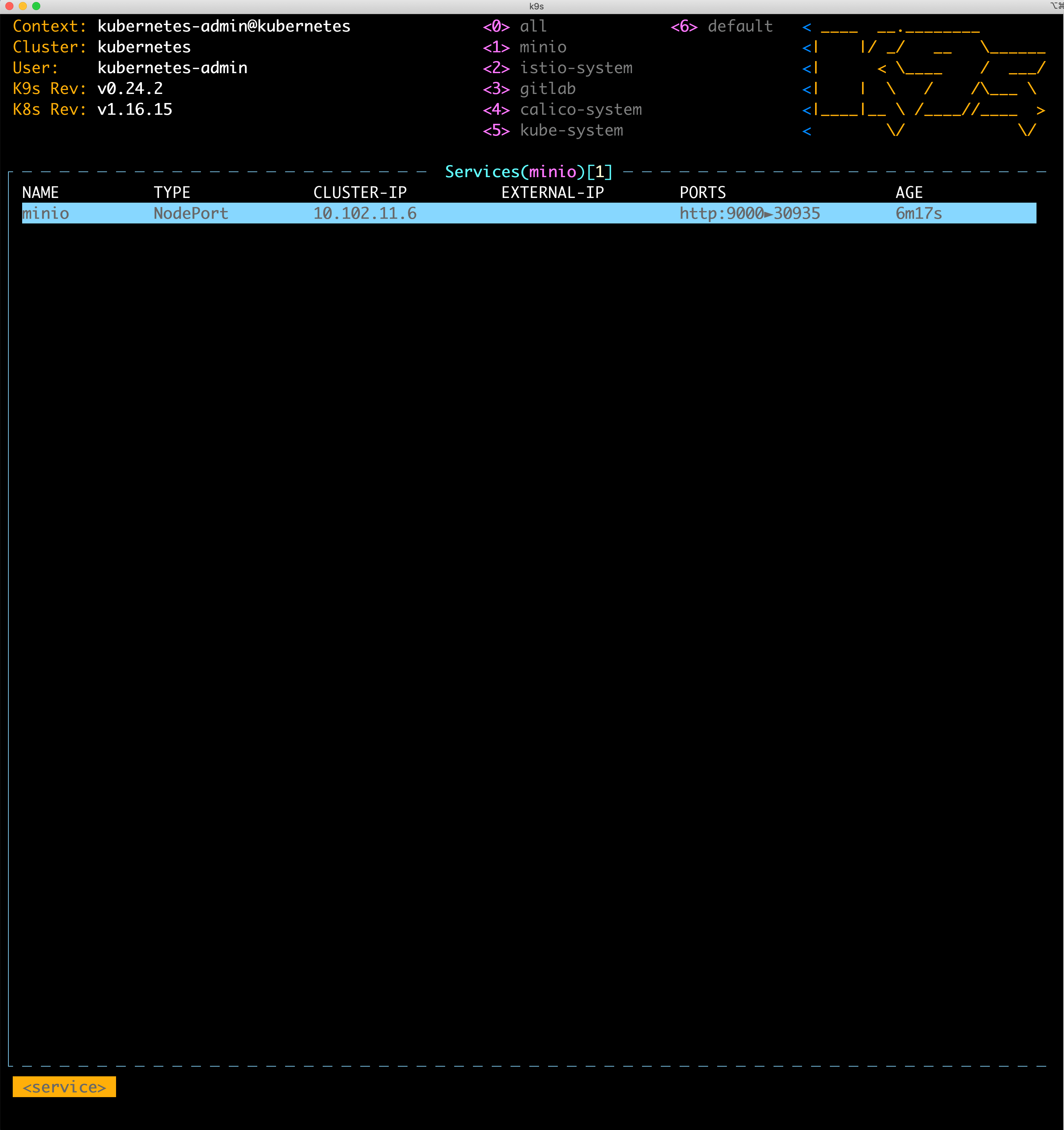
- Changed my service to NodePort
apiVersion: v1
kind: Service
metadata:
  annotations:
    meta.helm.sh/release-name: minio
    meta.helm.sh/release-namespace: minio
  creationTimestamp: "2021-03-05T02:14:44Z"
  labels:
    app: minio
    app.kubernetes.io/managed-by: Helm
    chart: minio-8.0.10
    heritage: Helm
    release: minio
  name: minio
  namespace: minio
  resourceVersion: "4382886"
  selfLink: /api/v1/namespaces/minio/services/minio
  uid: f7fc292f-3c8d-4395-ad27-96110a6a2aba
spec:
  clusterIP: 10.102.11.6
  ports:
  - name: http
    port: 9000
    protocol: TCP
    targetPort: 9000
  selector:
    app: minio
    release: minio
  sessionAffinity: None

 type: ClusterIP # -> Change here to NodePort

status:
  loadBalancer: {}
Install dvc and run
source myenv/bin/activate
pip install "dvc[s3]"
Depending on the type of the remote storage you plan to use, you might need to install optional dependencies: [s3], [azure], [gdrive], [gs], [oss], [ssh]. Use [all] to include them all.
- I made test repository on gitlab
git clone https://gitlab.com/kade93/dvc-test
cd dvc-test

>
 dvc init

Initialized DVC repository.

You can now commit the changes to git.

+---------------------------------------------------------------------+
|                                                                     |
|        DVC has enabled anonymous aggregate usage analytics.         |
|     Read the analytics documentation (and how to opt-out) here:     |
|             <https://dvc.org/doc/user-guide/analytics>              |
|                                                                     |
+---------------------------------------------------------------------+

What's next?
------------
- Check out the documentation: <https://dvc.org/doc>
- Get help and share ideas: <https://dvc.org/chat>
- Star us on GitHub: <https://github.com/iterative/dvc>

>
git commit -m "Initialize DVC"

[master (최상위-커밋) 245afcd] Initialize DVC
 9 files changed, 515 insertions(+)
 create mode 100644 .dvc/.gitignore
 create mode 100644 .dvc/config
 create mode 100644 .dvc/plots/confusion.json
 create mode 100644 .dvc/plots/confusion_normalized.json
 create mode 100644 .dvc/plots/default.json
 create mode 100644 .dvc/plots/linear.json
 create mode 100644 .dvc/plots/scatter.json
 create mode 100644 .dvc/plots/smooth.json
 create mode 100644 .dvcignore
(myenv)
- I used scp to get large datafile
scp -r sample-csv xxx@<node-ip>:/home/xxx/kade/dvc-test/
xxx@<node-ip>'s password:
weekly-top10.csv                                                                                             100% 1635   287.4KB/s   00:00
daily-top10.csv                                                                                              100% 1595   362.8KB/s   00:00
monthly-top10.csv                                                                                            100% 1657   420.2KB/s   00:00
semester-top10.csv
- dvc add
> ls
README.md  sample-csv
(myenv)
/home/xxx/kade/dvc-test/dvc-test [git::master *] [xxx@xxx-dev-01] [13:24]
> dvc add sample-csv
100% Add|██████████████████████████████████████████████████████████████████████████████|1/1 [00:00,  3.05file/s]

To track the changes with git, run:

	git add .gitignore sample-csv.dvc
(myenv)
-
made test bucket
using minio “client mc” is more comfortable
http://<node-ip>:30935/minio/dvc-test/
- replacing s3 to minio
dvc remote add -d storage s3://mybucket/dvcstore
git add .dvc/config
git commit -m "Configure remote storage"
dvc remote add -d myremote s3://dvc-test/
dvc remote modify myremote endpointurl http://<node-ip>:30935
dvc remote modify myremote access_key_id 'admin'
dvc remote modify myremote secret_access_key '<secret-key>'
git add sample-csv.dvc .gitignore
(myenv)
/home/xxx/kade/dvc-test/dvc-test [git::master *] [xxx@xxx-dev-01] [14:05]
> git commit -m "Add sample data"
[master 6950f00] Add sample data
 2 files changed, 6 insertions(+)
 create mode 100644 .gitignore
 create mode 100644 sample-csv.dvc
(myenv)
/home/xxx/kade/dvc-test/dvc-test [git::master *] [xxx@xxx-dev-01] [14:05]
> git add .dvc/config
(myenv)
/home/xxx/kade/dvc-test/dvc-test [git::master *] [xxx@xxx-dev-01] [14:05]
> git commit -m "Configure remote stroage"
[master 73a13bc] Configure remote stroage
 1 file changed, 7 insertions(+)
(myenv)
/home/xxx/kade/dvc-test/dvc-test [git::master *] [xxx@xxx-dev-01] [14:05]
> dvc push
5 files pushed
(myenv)
- checked uploaded md5 in minio
- git push
git push
Username for 'https://gitlab.com': kade93
Password for 'https://kade93@gitlab.com':
오브젝트 나열하는 중: 21, 완료.
오브젝트 개수 세는 중: 100% (21/21), 완료.
Delta compression using up to 16 threads
오브젝트 압축하는 중: 100% (18/18), 완료.
오브젝트 쓰는 중: 100% (21/21), 3.35 KiB | 3.35 MiB/s, 완료.
Total 21 (delta 6), reused 0 (delta 0)
To https://gitlab.com/kade93/dvc-test.git
 * [new branch]      master -> master
(myenv)
- git clone
git clone https://gitlab.com/kade93/dvc-test.git
'dvc-test'에 복제합니다...
Username for 'https://gitlab.com': kade93
Password for 'https://kade93@gitlab.com':
remote: Enumerating objects: 21, done.
remote: Counting objects: 100% (21/21), done.
remote: Compressing objects: 100% (18/18), done.
remote: Total 21 (delta 6), reused 0 (delta 0), pack-reused 0
오브젝트 묶음 푸는 중: 100% (21/21), 3.33 KiB | 853.00 KiB/s, 완료.
(myenv)
/home/xxx/kade/dvc-test/dvc-pull-test [xxx@xxx-dev-01] [14:10]
> ls
dvc-test
(myenv)
> cd dvc-test
(myenv)
/home/xxx/kade/dvc-test/dvc-pull-test/dvc-test [git::master] [xxx@xxx-dev-01] [14:11]
> ls
sample-csv.dvc
(myenv)
- dvc pull and get data
dvc pull
A       sample-csv/
1 file added and 4 files fetched
(myenv)
/home/xxx/kade/dvc-test/dvc-pull-test/dvc-test [git::master] [xxx@xxx-dev-01] [14:11]
> ls
sample-csv  sample-csv.dvc
(myenv)
/home/xxx/kade/dvc-test/dvc-pull-test/dvc-test [git::master] [xxx@xxx-dev-01] [14:11]
> cd sample-csv
(myenv)
/home/xxx/kade/dvc-test/dvc-pull-test/dvc-test/sample-csv [git::master] [xxx@xxx-dev-01] [14:11]

> ls
daily-top10.csv  monthly-top10.csv  semester-top10.csv  weekly-top10.csv

(myenv)